 USING THE TABLEBUILDER
INTRODUCTION
For general information relating to the TableBuilder or instructions on how to use features of the TableBuilder product, please refer to the User Manual: TableBuilder, 2011 (cat. no. 1406.0.55.005).
Information relating to survey methodologies, such as the counting units and weights applied to the TableBuilder dataset, are explained in the Survey methodology section.
The TableBuilder dataset contains all of the person level data applicable to the SEW. Information on the structure is provided in the File structure section.
USING THE DATA
Counting units and weights
Population estimates of Persons can be obtained from the 2010 CORMS TableBuilder. When producing tables in TableBuilder, the summation option or counting unit will automatically be added to the table.
Multiple response data items
A number of data items produced from the survey allow a respondent to fall into multiple categories. These are referred to as multiple response data items. An example is shown below.
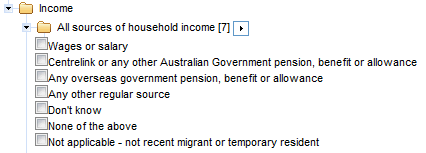
When a multiple response data item is tabulated, a person is counted against each response they have provided (e.g. a person who receives wages or salary, Centrelink payment and any other regular source will be counted one time in each of those three categories).
Similar to a single response data item, a person not within the appropriate population will fall into the 'Not applicable' category (e.g. a person who is not a recent migrant or temporary resident and is therefore considered 'Not applicable' to that data item).
A category exists for persons who are in scope of the population but did not provide a valid response to any other categories (e.g. a person who does not receive income from any of the above sources will fall into the category 'None of the above').
As a result, each person in the appropriate population is counted at least once, while some persons are counted multiple times. The total for multiple response data items is therefore greater than or equal to the sum of its components. In the example below, the sum of the components is 1,573.8, whereas the total is 1209.9.

Field exclusion rules
Field exclusion rules exist when two or more data items cannot be added to the same table due to confidentiality risks within the data.
The CORMS TableBuilder does not contain any field exclusion rules.

 Quality Declaration
  Print Page
 Print All