 USING THE TABLEBUILDER
INTRODUCTION
EXAMPLE: USING MULTIPLE RESPONSE DATA ITEMS
EXAMPLE: A TABLE USING SUB-PERSON LEVEL DATA ITEMS
INTRODUCTION
For general information relating to the TableBuilder or instructions on how to use features of the TableBuilder product, please refer to the User Manual: TableBuilder, 2011 (cat. no. 1406.0.55.005).
Information relating to survey methodologies, such as the scope, coverage and data collection are explained in the Survey Methodology section.
The TableBuilder dataset contains nine of the ten levels of data applicable to the SDAC. Information on the ten survey levels and their structure is provided in the File Structure section.
Level 8 (All Recipients), has not been released in TableBuilder due to the complexity involved in using and interpreting data on this level. Unlike other sub-person levels, the All Recipients level contains a ‘many to many’ relationship. This describes the ability for a ‘Recipient of care’ to have multiple 'Carers' while a 'Carer' can also have multiple ‘Recipients of care’. To discuss your data needs relating to this level, please contact the ABS National Information Referral Service (NIRS) on 1300 135 070.
EXAMPLE: USING MULTIPLE RESPONSE DATA ITEMS
A number of data items produced from the SDAC allow a respondent to provide more than one response. These are referred to as multiple response data items. An example of one of these items being used within the TableBuilder is shown below.
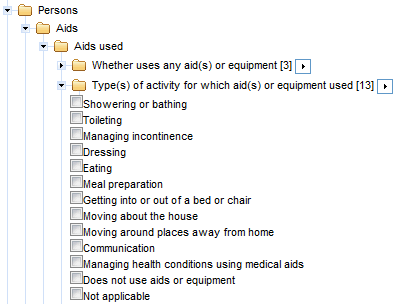
In this example, a series of questions is asked in the survey, relating to each activity, in order to produce the data item 'Type(s) of activity for which aid(s) or equipment used'. Responses to these questions determine whether an aid or equipment is used for a given activity. A person may indicate the use of an aid(s) or equipment for more than one activity, meaning they have supplied multiple responses to this data item.
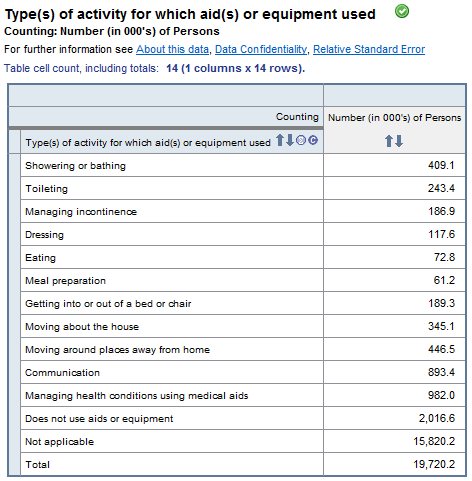
When a multiple response data item is tabulated, a person is counted against each category, for which they have provided a response (e.g. a person who uses an aid(s) or equipment for Toileting, Dressing and Eating will be counted against each of these three categories).
Similar to a single response data item, a person not within the appropriate population will fall into the ‘Not Applicable’ category (e.g. a person without a disability is not asked about their use of an aid(s) or equipment and is therefore considered ‘Not Applicable’ for this data item).
A category exists for persons who are in scope of the population but do not provide a valid response to any categories corresponding to the activities (i.e. a person requiring assistance for one or more activities but who does not use an aid(s) or equipment for any activities will fall into the category ‘Does not use aids or equipment’).
Therefore, each person in the appropriate population is counted at least once, while some persons are counted multiple times. The total for multiple response data items, is therefore less than or equal to the sum of its components. In the example below, the sum of the components is 21,784.1.
 EXAMPLE: A TABLE USING SUB-PERSON LEVEL DATA ITEMS
An individual person can be represented multiple times within a sub-person level, dependent on the number of instances in which they meet the criteria for that level. Sub-person levels are said to have a 'one to many' relationship. For example, a single individual who reported multiple health conditions on the Person level would contribute multiple records to the All Conditions level, equal to the number of health conditions they reported.
Care needs to be taken when interpreting tables, where data items have been included from both person and sub-person levels.
The table below draws upon ‘Whether has a disability’ from the Person level and ‘Extent to which need for assistance is met’ from the Broad Activities level. This table is followed by a practical demonstration of how estimates may be derived when using sub-person levels.
Note:
In order for a person to contribute record(s) to the Broad Activity level they must experience difficulty with
one or more broad activities. A record is created for each activity where the person experiences difficulty.
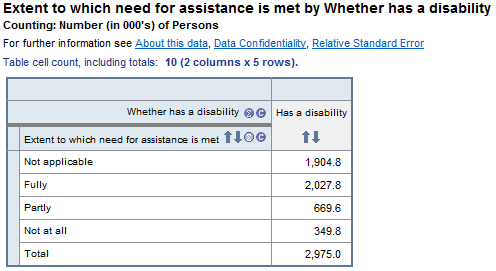
In the table above, the sum of the components is far greater than the total (4,952.0 versus 2,975.0). This is because, for each activity where a person experiences difficulty, a response is required to the item ‘Extent to which need for assistance is met’. A person can experience difficulty in multiple activities and can therefore contribute more than one record to the response categories for this item (i.e. Fully, Partly, Not at all and Not applicable).
The ‘Total’ refers to the number of persons contributing to the table and is derived from the person level item ‘Whether has a disability’. Only
one record can be attributed to a Person level item, unless the response categories for that item allow multiple responses.
An example of how this table is derived is shown below, where the population consists of just one person:
 |
| Person Level – 1 record / person exists |
| Data item:
Whether has a disability? | |
| Category 1) Has a disability | Yes |
| Category 2) Does not have a disability | - |
| 10 x Data items:
Whether needs assistance or has difficulty with… |
| 1) Mobility? | Yes |
| 2) Self-care? | - |
| 3) Oral communication? | - |
| 4) Health care? | Yes |
| 5) Cognitive or emotional tasks? | Yes |
| 6) Household chores? | - |
| 7) Property maintenance? | Yes |
| 8) Meal preparation? | Yes |
| 9) Reading or writing? | - |
| 10) Private transport? | - |
| Broad Activity Level – 5 records exist (derived from 10 x Person level data items) |
|
| Data item:
Extent to which need for assistance is met? |
| Activity
(Records 1 to 5) | Category 1 | Category 2 | Category 3 | Category 4 |
Fully | Partly | Not at all | Not applicable |
| Record 1: Mobility | Yes | - | - | - |
| Record 2: Health care | - | - | Yes | - |
| Record 3: Cognitive or emotional tasks | - | - | Yes | - |
| Record 4: Property maintenance | - | - | - | Yes |
| Record 5: Meal preparation | - | - | - | Yes |
| Whether has a disability: | Has a disability |
| Extent to which need for assistance is met |
| Fully | 1 |
| Partly | 0 |
| Not at all | 2 |
| Not applicable | 2 |
| Total | 1 |
Note:
- The total population for this table is one person, representing the number of applicable Person level records to the item ‘Whether has a disability’ (i.e. those who have a disability).
- The sum of the components for this table is five records, representing the number of instances on the Broad Activity level where a person experienced difficulty or needed assistance with an activity. These were derived from the ten person level data items.
- The applicable population for this table is three, representing the records (activities) where the person indicated experiencing difficulty and needing assistance (i.e. mobility, health care and cognitive or emotional tasks).
The ‘not applicable’ population for this table is
two, representing the records (activities) where the person indicated experiencing difficulty but
not needing assistance (i.e. property maintenance and meal preparation). These two records are on the Broad Activity level but do not apply to the data item ‘Extent to which need for assistance is met'.

 Quality Declaration
  Print Page
 Print All